
Premium Payment Options

For Generations Advantage Members

Paying Your Plan Premium | Generations Advantage

Choose the payment method that works best for you.
If you already have a payment method set up, no action is needed. Monthly premium payments are processed within the first week of the month.

Automatic payments are processed using the payment method on file. If you need to make a change to your automatic payment setup, you can complete the automatic payment form.

Automatic, Recurring Payments (Recommended)

Set it and forget it—your premium will be automatically withdrawn on the 1st week of every month.

You'll need your:

  • Member ID card
  • Date of birth
  • Bank account and routing number OR
  • Credit card number and expiration

Set up automatic payment in one of the following ways:


One-Time Online Payment

Make a secure, one-time payment online using a credit or debit card—available 24/7.

You’ll need your:

  • Member ID card
  • Billing address and ZIP code
  • Invoice Account Number (ARAC)
  • Credit/debit card number, expiration date, and security code

If you don’t have your invoice, call 1-866-544-7504 (TTY: 711) to get your account number.

Go to Online Bill Pay

(You will be redirected to our secure payment vendor site)

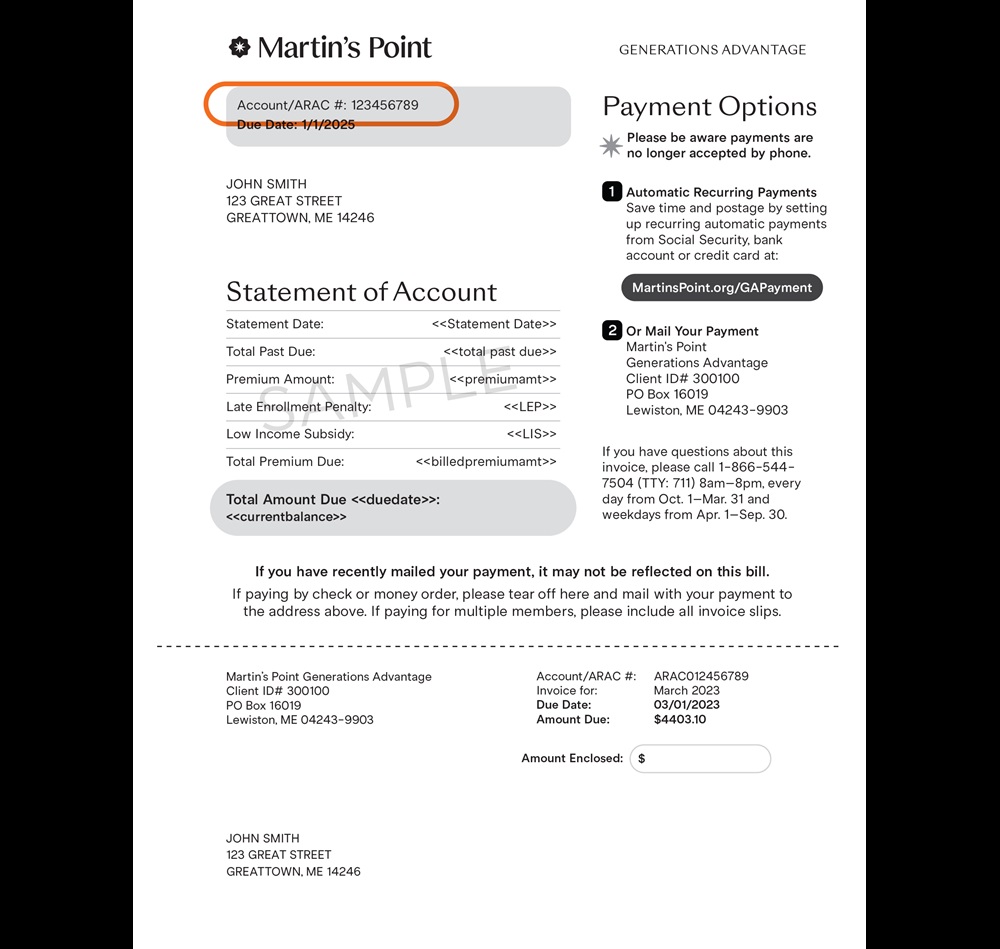
Your account number, also referred to as your ARAC number, is a unique identifier required for making payments and managing your account. It is located in the top-left corner of your premium bill next to the label 'Account # / ARAC#'. Refer to the example below to easily locate it.

If paying for multiple people, make sure to include the payment coupon for each member. 


Mail your monthly premium payment directly to our plan with a check or money order along with the bottom portion of your invoice. If paying for multiple people, make sure to include the payment coupon for each member. 

Mail to:
Martin’s Point Generations Advantage
Client ID# 300100
PO Box 16019
Lewiston, ME 04243-9903


Find out what your premium payment is for your state/county of residence by logging into your Member Portal or visiting Plans and Benefits.

Premium balance timing by payment method
Autopay – Bank account (ACH)
Autopay
Typically runs
2nd or 3rd business day of the month
Balance clears
Within 1 business day after the ACH run (once applied)
Notes
May shift if there’s a system or banking delay. Red balance displays until processing completes.
Autopay – Credit card (CC)
Autopay
Typically runs
7th of the month
Balance clears
Within 1 business day after the run (once applied)
Notes
May be delayed depending on processing timing. Red balance displays until processing completes.
Manual one-time payments
Manual
Credit card
Timing varies based on submission and processing
Check
Timing varies based on receipt and posting
Notes
Red balance displays until processing completes.
SSA / RRB payments
Deduction
Typically applied
3rd week of the month
Balance clears
Once payment is processed
Notes
Timing is driven by CMS schedules. Red balance displays until processing completes.

Important nuances

  • Balances do not update at submission.
  • Timing varies by payment method and month.
  • Red balance clears once processing completes.