For Health Care Center patients.
Click on a category below to jump directly to that topic's frequently asked questions.

Click on a category below to jump directly to that topic's frequently asked questions.
Once you are registered for a patient portal account, you can do the following to help manage your health care:
This guide walks you through registering for a patient portal account: MyMartinsPoint® Patient Portal User Guide [PDF]
This guide walks you through logging in to your patient portal account: MyMartinsPoint® Patient Portal User Guide [PDF]
Martin’s Point offers primary and specialty care at select health care centers, and in partnership with specialty providers and affiliate practices. Your PCP can help you connect with a specialist.
Services offered include:
A list of available services by location can be found on the Learn About Our Services page.
You can use the Provider Directory on the Martin’s Point website to search for a provider by name, specialty, or location.
Access the Provider Directory by using the links below, or by clicking the "Find a Provider" option under the Primary Care dropdown menu.
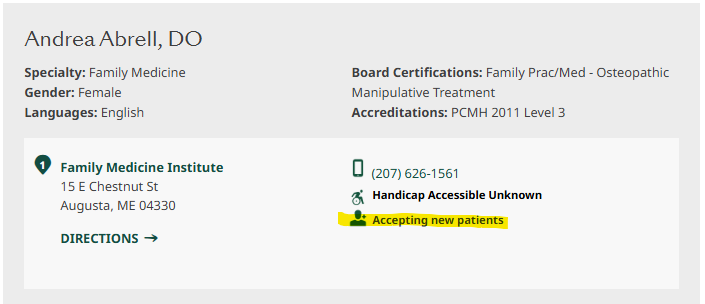
When using the Provider Directory, you will see a profile of each provider in your search results. An icon that says “Accepting new patients” will appear if a provider is accepting new patients to their practice (see image below).
We recommend calling the provider’s office to confirm that they are accepting new patients.
If your PCP leaves, we’ll notify you by mail and provide you with the information regarding your future care options.
Yes. Nurse Practitioners (NPs), Family Nurse Practitioners (FNPs), and Physician Associates (PAs) are licensed providers who can serve as a PCP. They work closely with physicians and the care team to provide care.
Yes. Current patients may schedule an appointment online by using the Self-Schedule tool.
If you don't see your provider or the type of appointment you need, or you're prompted to call your doctor's office, please continue using your usual method to schedule.
Self-scheduling is not for medical emergencies. If you're experiencing a life-threatening emergency, call 911 immediately.
Please go to the Care Team Connect page to find information on how to contact us about specific questions, needs, or health concerns.
This resource is also available for download: Connect with Your Care Team [PDF]
If you need medical assistance outside of your Martin’s Point Health Care Center’s office hours, please call your provider’s office and leave a message with the answering service.
Our on-call provider will respond to calls in order of medical priority. If you do not receive a call back within 20 minutes of placing your call to our answering service, please call again and let the answering service know you are still awaiting a call back.
Martin's Point accepts the following insurances:
Private Health Insurance/Commercial Plan
Medicare and Medicaid Health Plans
Medicare
Medicaid
If you are a new patient on an insurance plan we accept, be sure to notify your insurance plan of your PCP change in advance of receiving services. You may not have coverage if you see a Martins Point PCP or specialist without the plan’s authorization.
Follow this checklist to help ensure a smooth billing process:
Know the limitations of the referral and obtain an extension or expansion of the scope of the referral if needed. To learn more about referrals, download What is a referral? [PDF]
For additional information, visit the Patient section of the Billing page.
Questions? Contact the Patient Accounts, Billing Office at 1-800-499-7875 | Available 8 am–4:30 pm, Monday through Friday
If you are an established patient and your commercial coverage changes to a plan we do not accept, Martin's Point may be considered out-of-network by your plan (call your new plan for confirmation).
For out-of-network HMO plans, this means you will not have coverage if you see a Martin’s Point PCP or specialist without the plan’s authorization. If your new plan is a PPO plan not listed, we may bill you up to any remaining balance after the plan pays its out-of-network portion.
Questions? Contact the Patient Accounts, Billing Office at 1-800-499-7875 | Available 8 am–4:30 pm, Monday through Friday
Yes. You may set up a Card on File Agreement to securely pay copays and future patient charges automatically using your credit card.
You set dollar amount limits for authorized automatic charges and receive emails providing advance notice of upcoming charges and payment receipts. Payment amounts are applied to the credit card after your health insurance processes your claim and assigns an amount as your responsibility.
Please note: This option is different from and in addition to the Payment Plan some patients may have in place setting monthly payments for past-due balances.
Have questions? For additional FAQs relating to the Card on File Agreement,visit the Patient Resources page.
Formal payment plans can be set up at one of our Health Care Centers or by calling Patient Accounts–Billing directly. The goal of all payment plans is to have balances paid in full within six months, however, we recognize this is not always possible.
If you feel you are unable to meet our minimum monthly payment requirement, please contact Patient Accounts–Billing to discuss our financial expectations and to gain a better understanding of how we can best partner with you to pay your balance.
Exceptions will be based on demonstrating financial need or special circumstances.
Payment Method for Payment Plans—The preferred method of setting up payment plans is to keep your credit or debit card on file and auto-debit the payment each month. Please note that, when a payment plan is set up, only balances already on your account are included.
Any additional balances that you wish to add to the plan will require you to call Patient Accounts–Billing (1-800-499-7875) and may require an increase in the monthly payment amount.
In addition to auto-debit, we can also set you up to receive statements on a monthly basis, at which time you can mail in a check, pay online via the patient portal, or make a call to Patient Accounts–Billing to pay with a credit card over the phone. If you happen to be at a Health Care Center for an appointment and want to pay, we can also take your payment in cash.
Martin’s Point Health Care is committed to providing quality care to our patients regardless of their financial status. Through our financial assistance program—available for medically necessary services—you may qualify for free care or a reduced cost after insurance processing.
Application for Financial Assistance for Patients [PDF]
Submit this form to request support for your healthcare costs, applicable to medically necessary services provided by Martin’s Point.
Martin’s Point estimated prices for procedures listed by Current Procedural Technology (CPT) code are available in the Price Disclosure List [PDF] These are estimates and prices are subject to change. Final cost will be determined after service is provided and insurance is processed.
Access price transparency tools and information from the Maine Health Data Organization.
If you have questions, you may call the Martin’s Point Patient Accounts–Billing Office at1-800-499-7875| Available 8 am–4:30 pm, Monday through Friday
You have the right to receive a “Good Faith Estimate” explaining how much your medical care will cost.
Under the law, health care providers must provide an advance estimate of the bill for medical items and services to patients who don’t have insurance or who are not using insurance. This is called a Good Faith Estimate.
When do you have the right to receive a Good Faith Estimate from your provider for the total expected cost of any non-emergency services?
Martin’s Point Health Care will send the estimate to you by mail or through the MyMartinsPoint® patient portal if you have a portal account. Make sure to save a copy of your written Good Faith Estimate to compare with bills you receive from Martin’s Point for this item or service. If you receive a bill that is at least $400 more than your Good Faith Estimate, you can dispute the bill.
For more details about your right to a good faith estimate, visit CMS.gov/NoSurprises