Have questions about Primary Care Providers (PCPs)? We're here to help.
Get answers to frequently asked questions relating to Primary Care Providers (PCPs) below.

Get answers to frequently asked questions relating to Primary Care Providers (PCPs) below.
Yes. Having a PCP helps ensure you get preventive and routine services and that your overall care is coordinated with any specialty services you may need.
Note: Generations Advantage HMO and HMO-POS plan members are required to have an in-network PCP on file. PPO-style plans do not require an in-network PCP.
No. Members can choose any provider within our network, which includes providers at our Martin’s Point Health Care Centers and other participating health care providers in the areas where our health plans are offered.
Using in-network providers ensures the best coverage and lowest out-of-pocket costs.
You can use your health plan's Provider Directory on the Martin’s Point website to search for a provider by name, specialty, or location.
Access your Provider Directory by using the links below, or by clicking the "Find a Provider" option under the TRICARE Plans or Medicare Plans dropdown menu.
HMO and HMO-POS plan members are required to have a designated, in-network PCP. PPO plan members do not have this requirement. We recommend the use of in-network specialist to receive the highest level of coverage.
Member Services can help you locate in-network providers who are accepting new patients.
USFHP beneficiaries are encouraged to choose a PCP in our network, but it’s not required to stay enrolled. You can see a provider outside the network, however doing so usually means you’ll pay more out of pocket, and some services may only be covered when received in-network. Choosing an in-network PCP helps keep your costs lower and makes it easier to coordinate your care.
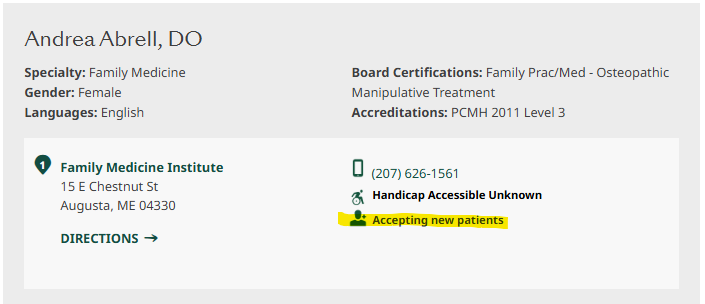
When using the Provider Directory, you will see a profile of each provider in your search results. An icon that says “Accepting new patients” will appear if a provider is accepting new patients to their practice (see image below).
We recommend calling the provider’s office to confirm that they are accepting new patients.
Yes. Member Services can assist in finding providers who are accepting new patients and help update the PCP on file.
Call Generations Advantage Member Services
1-866-544-7504 (TTY: 711)
Call US Family Health Plan Member Services
1-888-674-8734 (TTY: 711)
Once you have established care with your PCP, you should notify the plan. To do so, you can either:
Call Generations Advantage Member Services
1-866-544-7504 (TTY: 711)
Call US Family Health Plan Member Services
1-888-674-8734 (TTY: 711)
Yes. You can change your PCP anytime, for any reason. Once you’ve established care with your new PCP, you should notify the plan via the Member Portal or by calling Member Services.
Updated PCP information provided by phone typically takes one or two business days to reflect in our system.
Call Generations Advantage Member Services
1-866-544-7504 (TTY: 711)
Call US Family Health Plan Member Services
1-888-674-8734 (TTY: 711)
If your designated PCP leaves the network, we’ll notify you by mail and provide you with the guidance needed to choose a new PCP.
In some cases, when members enroll and haven’t yet selected a PCP, we assign one to ensure they have access to care right away.
Members can change their PCP anytime and notify the health plan through the Member Portal or by calling Member Services once care has been established.
Call Generations Advantage Member Services
1-866-544-7504 (TTY: 711)
Call US Family Health Plan Member Services
1-888-674-8734 (TTY: 711)
Yes. Nurse Practitioners (NPs), Family Nurse Practitioners (FNPs), and Physician Associates (PAs) are licensed providers who can serve as a PCP. They work closely with physicians and the care team to provide care.
Sometimes a doctor’s name appears as your PCP even though you regularly see a Nurse Practitioner (NP) or Physician Associate (PA) in their office.
That’s because your NP or PA works closely with the doctor as part of your care team. In some cases, the doctor’s name is listed for administrative or billing purposes, but you’ll continue to see your regular provider for your appointments and ongoing care.
To update your Primary Care Provider selection on file with us, please visit your portal to make that change: