
Search the formulary by therapeutic category and drug class.
Posted 02/24/26

Browse medications by category.
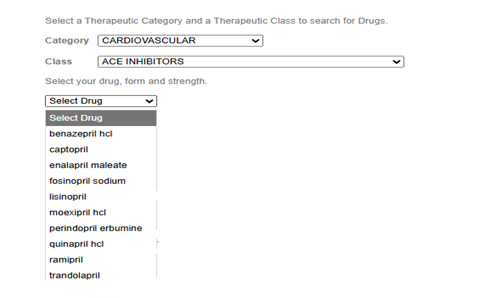
Finding a covered medication on the Martin’s Point Generations Advantage formulary is now faster and more intuitive. Providers can now search the formulary not only by the drug name, itself, but also (or instead) by Therapeutic Category and then by Medication Class, helping you quickly find cost-effective medications for our members.
Here is an example:
When to use category search.
- Selecting a covered alternative within the same class.
- Managing therapy changes due to coverage or cost considerations.
- Identifying formulary-preferred options for new diagnoses.
You can find the formulary search tools on the Provider Pharmacy page: Martinspoint.org/For-Providers/Resources/Pharmacy
Available therapeutic categories.
Analgesics | Anti-Infectives | Antineoplastic Agents | Cardiovascular | Central Nervous System | Endocrine and Metabolic | Gastrointestinal | Genitourinary | Hematologic | Immunologic Agents | Nutritional/Supplements | Ophthalmic | Otic | Respiratory | Topical
This enhanced search experience supports efficient prescribing and helps identify cost-effective medications for Generations Advantage members.

