For Generations Advantage members.
Click on a category below to jump directly to that topic's frequently asked questions:

Click on a category below to jump directly to that topic's frequently asked questions:
To register for your member portal account, you will need your Member ID (found on your health plan ID card). You cannot register for a member portal account until after your coverage begins.
To register for a new account or access an existing account, visit the Member Portal Account Registration page.
No, you must use different usernames and passwords if you are enrolled in both Generations Advantage and the US Family Health Plan as these are two separate accounts.
Yes, if you change Generations Advantage plans, your member portal account will stay the same. The plan change will be reflected in your portal.
If you have forgotten your username, visit the Recover Your Username page.
Enter the email address associated with your account. You will receive an email with your username and links to log in to your account.
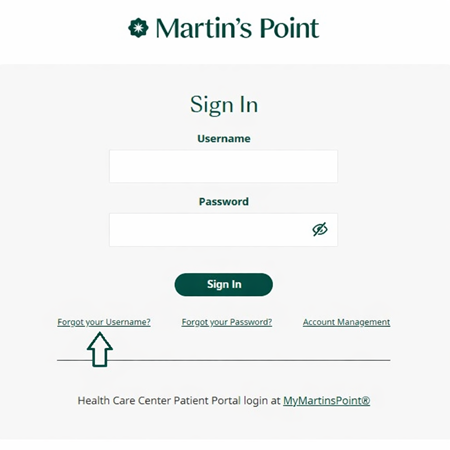
You can also click on “Forgot your Username” from the member portal log-in screen:
To change your username, follow these steps:
Yes. When creating a username, you must follow these requirements:
If you don’t receive the reset email within a few minutes, check your spam or junk folder. If it’s not there, try resending the reset request from the log-in page.
If you still don’t receive it, please contact Martin’s Point Member Services for help verifying your account and assisting with the reset process.
You can contact Martin’s Point Member Services for assistance with logging in or account issues.
Generations Advantage Member Services: 1-866-544-7504 (TTY: 711)
If you have forgotten your password, you can visit Forgot Password to reset it.
You can also click on “Forgot your Password" from the member portal log-in screen:
To change your password, follow these steps:
Yes. When creating a password, you must follow these requirements:
No, your password does not expire. You may change your password whenever you like, but not more than once in a 24-hour period.
If you don’t receive the reset email within a few minutes, check your spam or junk folder. If it’s not there, try resending the reset request from the log-in page.
If you still don’t receive it, please contact Martin’s Point Member Services for help verifying your account and assisting with the reset process.
You can contact Martin’s Point Member Services for assistance with logging in or account issues.
Generations Advantage Member Services: 1-866-544-7504 (TTY: 711)
Acceptable payment types to pay your premium are:
Your account number, also referred to as your ARAC number, is a unique identifier required for making payments and managing your account. It is located in the top-left corner of your premium bill next to the label 'Account # / ARAC#'. Refer to the example below to easily locate it.
If paying for multiple people, make sure to include the payment coupon for each member.
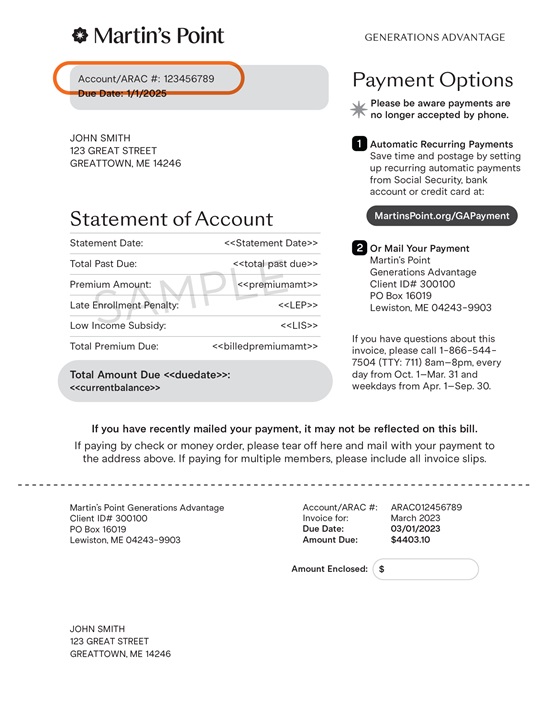
Yes. Mail your monthly premium payment directly to our plan with a check or money order along with the bottom portion of your invoice. If paying for multiple people, make sure to include the payment coupon for each member.
Mail to:
Martin’s Point Generations Advantage
Client ID# 300100
PO Box 16019
Lewiston, ME 04243-9903
Find out what your premium payment is for your state/county of residence by logging into your Member Portal or visiting Plans and Benefits.
Below is the payment processing schedule for various payment options. It is important to note that:
Yes. Having a PCP helps ensure you get preventive and routine services and that your overall care is coordinated with any specialty services you may need.
Note: Generations Advantage HMO and HMO-POS plan members are required to have an in-network PCP on file. PPO-style plans do not require an in-network PCP.
You can use the Generations Advantage Provider Directory on the Martin’s Point website to search for a provider by name, specialty, or location.
Access the Generations Advantage Provider Directory here, or by using the links below, or by clicking the "Find a Provider" option under the Medicare Plans dropdown menu.
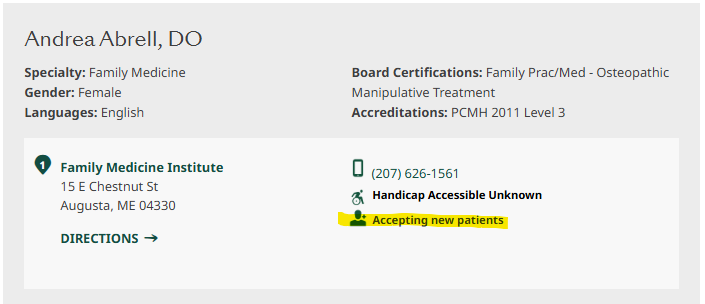
When using the Provider Directory, you will see a profile of each provider in your search results. An icon that says “Accepting new patients” will appear if a provider is accepting new patients to their practice (see image below).
We recommend calling the provider’s office to confirm that they are accepting new patients.
Once you have established care with your PCP, you should notify the plan. To do so, you can either:
Yes. You can change your PCP anytime, for any reason. Once you’ve established care with your new PCP, you should notify the plan via the member portal or by calling Member Services.
Updated PCP information provided by phone typically takes one or two business days to reflect in our system.
HMO and HMO-POS plan members are required to have a designated, in-network PCP. PPO plan members do not have this requirement. We recommend the use of in-network specialist to receive the highest level of coverage.
Member Services can help you locate in-network providers who are accepting new patients.
If your designated PCP leaves the network, we’ll notify you by mail and provide you with the guidance needed to choose a new PCP.
In some cases, when members enroll and haven’t yet selected a PCP, we assign one to ensure they have access to care right away.
Members can change their PCP anytime and notify the health plan through the member portal or by calling Member Services once care has been established.
Yes. Member Services can assist in finding providers who are accepting new patients.
No. Members can choose any provider within our network, which includes providers at our Martin’s Point Health Care Centers and other participating health care providers in the areas where our health plans are offered.
Using in-network providers ensures the best coverage and lowest out-of-pocket costs.
Yes. Nurse Practitioners (NPs), Family Nurse Practitioners (FNPs), and Physician Associates (PAs) are licensed providers who can serve as a PCP. They work closely with physicians and the care team to provide care.
Sometimes a doctor’s name appears as your PCP even though you regularly see a Nurse Practitioner (NP) or Physician Associate (PA) in their office.
That’s because your NP or PA works closely with the doctor as part of your care team. In some cases, the doctor’s name is listed for administrative or billing purposes, but you’ll continue to see your regular provider for your appointments and ongoing care.
Additional information can be found on the Wellness Wallet Benefit page.
Eligible items by plan can be found here: 2026 Eligible Items and Services List [PDF]
No. Gym and golf membership fees are only reimbursable for the current year (up to the Wellness Wallet limit). Membership fees are not reimbursable for dates of service that extend into the next year.
No. However, depending on your plan, we cover many classes, fees, or memberships for reimbursement under your Generations Advantage plan's Wellness Wallet benefit. See your individual plan page for your yearly reimbursement amount and eligible items/services.
You can purchase equipment from any licensed retail establishment. We will not approve reimbursement for fitness equipment that has been purchased from a nonretail source (example: yard sale or Craigslist, etc.).
Safety is important and we want to ensure there is no risk of injury from noncertified equipment. If you seek to save on the costs or prefer to purchase second-hand equipment, there are several retailers—such as Play-It-Again Sports—that offer used equipment that has been checked for proper function and safety.
Spouses can split family gym memberships or shared equipment. Members cannot split "single use" items or equipment. (For example, a bike can be shared, but an Apple Watch cannot. A treadmill can be shared, but pair of skis cannot.)
Each spouse must complete their own Wellness Wallet Reimbursement Request form, including the member’s information (name, member ID number, and date of birth), and half the amount requested for reimbursement. When submitting a Wellness Wallet Reimbursement Request form, the purchase would be divided in half and applied to each member's Wellness Wallet balance, unless otherwise indicated by dollar amounts written on the form.
Split reimbursement requests must be done with the Wellness Wallet Reimbursement Request Form for the year of purchase, and submitted by mail. Split reimbursement requests cannot be submitted online.
Yes! Even if you join the plan mid-year, you are eligible to receive up to your Generations Advantage plan's entire Wellness Wallet amount for that particular plan year.
Dates of purchase for services or items must be within the dates you are actually enrolled in the current plan year in order to be reimbursed under that year's Wellness Wallet benefit (for example: if you enrolled in a Generations Advantage plan on September 1, items/services you purchased prior to September 1 are not eligible).
If you place an order for an item, but payment is not taken until a later date, the date you placed the order is considered the date of purchase as long as your receipt shows the date you placed the order. For example, if you place an order for an item on 12/31 but payment is not taken from your account until 1/1, your purchase date would be considered 12/31 provided that your receipt lists the 12/31 order date.
You can use credit card points or a gift card to purchase an item as long as the receipt shows the cash value of the item.
The proof of payment must indicate what was bought, how much it cost, and how it was paid for. This can be in the form of an itemized register receipt, bill stamped “paid”, or paid statement. Cancelled checks, credit card bills, and bank statements can also be used, but they must show detail relating to the item purchased.
We do not accept invoices, order/pick up confirmations, or shipping statements with no proof of payment. It is okay for you to use a gift card or gift certificate as the payment method, as long as the receipt indicates the payment method.
No. At this time only items specified in the Wellness Wallet list of covered items qualify for reimbursement. Eligible items change from year to year, so be sure you are referencing the list for the year of the purchase.
Yes! Under your Wellness Wallet benefit, the cost of taxes, shipping, delivery, and assembly can be reimbursed.
Members receive their notification of Wellness Wallet reimbursement determination on their Explanation of Benefits documents within 30 days after the reimbursement claim is processed. Declined reasons will be listed on the Explanation of Benefits.
Wellness Wallet reimbursement requests must be received by the plan no later than 120 days following the date of purchase.
For mailed-in requests:
Martin’s Point Generations Advantage
Claims Department
P.O. Box 3003
Fargo, ND 58108
For mailed-in and online requests:
Additional information can be found on the Hearing Benefit page.
You can find information about this legislation here on Maine.gov.
No, at this time the allowance can only be used for items specified in the Vision/Eyewear list of eligible items.
The proof of payment must indicate what was bought, how much it cost, and how it was paid for.
This can be in the form of an itemized register receipt, stamped bill, or paid statement. Cancelled checks, credit card bills, and bank statements can also be used, but they must show detail relating to the item purchased.
We do not accept invoices, order / pick up confirmations, or shipping statements with no proof of payment. It is okay for you to use a gift card or gift certificate as the payment method, as long as the receipt indicates the payment method.
Yes! You are eligible to receive up to the entire eyewear allowance amount that is offered under your Generations Advantage plan even if you join the plan mid-year. As a reminder, dates for received services or purchased items must be within the current plan year and within your dates of coverage in order to be reimbursed under that year's benefit.
If you place an order for an item, but payment is not taken until a later date, the date you placed the order is considered the date of purchase as long as your receipt shows the date you placed the order. For example, if you place an order for an item on 12/31 but payment is not taken from your account until 1/1, your purchase date would be considered 12/31 provided that your receipt lists the 12/31 order date.
A member can use credit card points or a gift card to purchase an item as long as the receipt shows the cash value of the item.
Members receive their notification of eyewear reimbursement determination on their Explanation of Benefits documents within 30 days after the reimbursement claim is processed. Denial reasons will be listed on the Explanation of Benefits.
Here are some tips to ensure the smoothest reimbursement experience:
For mailed-in requests:
Martin's Point Generations Advantage
Claims Department
P.O. Box 3003
Fargo, ND 58108
For mailed-in and online requests:
Additional information can be found on the Dental Plus Benefit page.
Dental Plus is an optional dental benefit available only to members enrolled in the Generations Advantage Essential (HMO-POS) plan. It provides additional coverage for basic and major restorative dental services for a monthly premium.
Dental Plus is available only to members enrolled in the Generations Advantage Essential (HMO-POS) plan who elect the coverage and pay the monthly premium.
The Dental Plus monthly premium is $69.
Dental coverage that is included with your Essential (HMO-POS) plan with no additional premium:
Dental Plus provides additional coverage for:
When combined with built-in coverage, members may receive up to two cleanings per calendar year (one under built-in coverage and one under Dental Plus).
You may add or drop Dental Plus one time at any point during the plan year.
If coverage is canceled before the effective date, it does not count toward the one add or drop per plan year.
You may choose from the following payment options:
To disenroll, submit a written request to Martin’s Point by fax or mail (see your Evidence of Coverage for details).
Yes. Many services — especially major services such as crowns, dentures, implants, and prosthetics — have frequency or replacement limits. Some services may be covered only once every several years or once per lifetime.
Predetermination is not required but is strongly encouraged for costly or extensive treatment plans. It helps you understand:
Use the online network dentist search tool and select the Martin’s Point Generations Advantage network.
Additional information can be found on the Martin's Point Prepaid Mastercard page.
No. Your card arrives active and ready to use. (Please sign the back of your card.)
The Martin’s Point Prepaid Mastercard is not compatible with digital wallet platforms. While it may appear that you have successfully added the card to a digital wallet, it will not work when you try to use it for transactions. You will need to use the card directly or use a different form of payment to complete a transaction, save the receipt, and file a claim for reimbursement.
As you use your card, remaining balances can be found on your Generations Advantage member portal at MartinsPoint.org or by calling Generations Advantage Member Services at 1-866-544-7504 (TTY: 711) 8am-8pm, every day from October 1–March 31 and weekdays from April 1–September 30.
At this time, card payments are available for a limited number of all eligible Wellness Wallet items/services and Eyewear at specific retailers.
At this time, card payments for Wellness Wallet items and Eyewear purchase are only accepted at a limited list of locations. You may try the card for eligible purchases at your retailer of choice, but please be prepared with an alternate payment method in case the transaction is declined.
No. Your card is loaded with two separate balances—one for your Wellness Wallet allowance and one for your Eyewear allowance. These separate balances cannot be combined.
Please Note: The benefits refresh yearly. Unused balances do not carry over to the next year. The available balance is updated automatically after each purchase is completed.
If you do not set up a PIN, select the “Credit” option. If you prefer, you may set up a PIN and use the PIN with the “Debit” option to access your funds. To set up a PIN, please call 1-866-898-9795.
Yes, always keep itemized receipts/proof of purchase. You may be contacted by the Martin’s Point Generations Advantage team to submit receipts to verify that expenses comply with your plan’s guidelines. Handwritten receipts are not accepted.
It is always advisable to check your available allowance balance(s) prior to using your card.
To use your card for a partial payment, simply ask the cashier to apply the available dollar amount to the card first (you will need to tell the cashier what this amount is) and pay the balance using your own preferred payment method. Be sure to keep your itemized receipt and proof of purchase.
You may purchase items using your own preferred payment method and request reimbursement online or by mail up to your annual allowance. Be sure to save and submit copies of your itemized receipts and proof of purchase.
As of January 1 of the current plan year (or as of a prior year disenrollment date if you leave the plan), any funds remaining on the card from the prior plan year are deleted. If you continue your plan enrollment for the next plan year, keep the card and the new plan year’s benefit allowances will be loaded onto the card as of January 1.